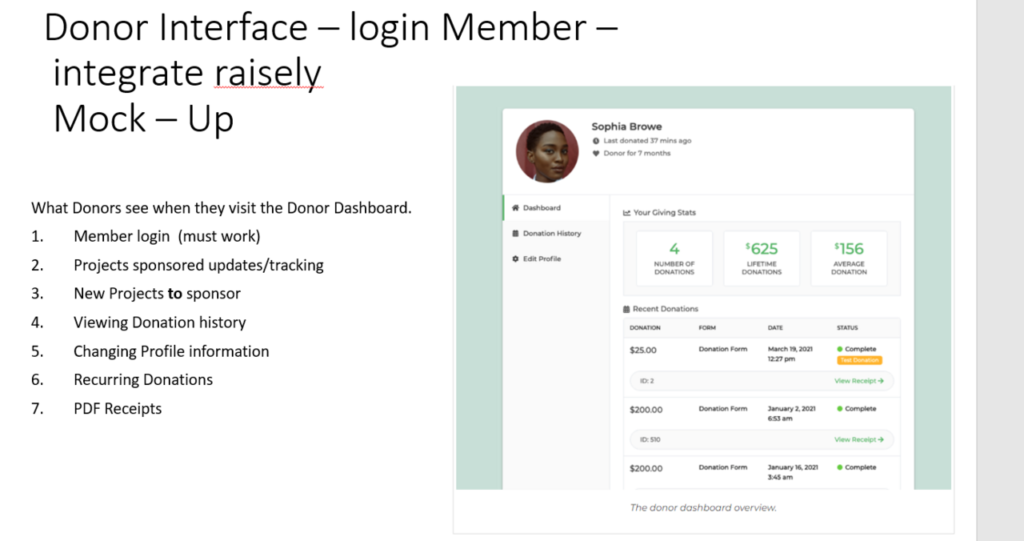
1. Member Login #
a. User Authentication:
- Sign Up/Sign In: Implement a secure registration and login system where donors can create an account or log in if they already have one.
- OAuth Integration: Utilize OAuth to allow users to log in using their social media accounts (e.g., Google, Facebook) for ease and security.
- Two-Factor Authentication (2FA): Enhance security by requiring an additional verification step during login.
b. Raisely Integration:
- Use Raisely’s API to authenticate users. This ensures that the donor’s data on Raisely is synchronized with your website’s interface.
2. Projects Sponsored Updates/Tracking #
a. Dashboard Display:
- Visual Representation: Use charts and graphs to display progress on projects the donor has sponsored.
- Updates: Include a section for regular updates, such as project milestones, photos, and reports.
b. Raisely Integration:
- Fetch project updates and tracking information from Raisely’s API to keep donors informed about the impact of their contributions.
3. New Projects to Sponsor #
a. Project Listings:
- Featured Projects: Highlight new and urgent projects that need funding.
- Search and Filter: Allow donors to search for projects by category, location, and funding status.
b. Raisely Integration:
- Pull data on new and ongoing projects from Raisely, ensuring the latest projects are always displayed.
4. Viewing Donation History #
a. Detailed Records:
- Transaction List: Show a list of all donations made by the donor, including date, amount, and project supported.
- Search and Sort: Enable donors to search and sort their donation history by various parameters.
b. Raisely Integration:
- Sync donation history using Raisely’s API to ensure the data is accurate and up-to-date.
5. Changing Profile Information #
a. Profile Management:
- Editable Fields: Allow donors to update personal information such as name, email, phone number, and address.
- Security Settings: Provide options to change passwords and manage 2FA settings.
b. Raisely Integration:
- Use Raisely’s API to update donor profile information, ensuring consistency across both platforms.
6. Recurring Donations #
a. Recurring Donation Management:
- Set Up and Edit: Allow donors to set up recurring donations, choose frequency (monthly, quarterly, annually), and update payment information.
- Cancellation: Provide an option to cancel recurring donations if needed.
b. Raisely Integration:
- Manage recurring donations through Raisely’s API, which handles scheduling and processing of recurring payments.
7. PDF Receipts #
a. Receipt Generation:
- Automated Receipts: Generate PDF receipts for each donation, available for download directly from the donor dashboard.
- Batch Receipts: Provide an option to download annual or custom date-range summaries of all donations.
b. Raisely Integration:
- Integrate with Raisely to fetch transaction details and generate receipts, ensuring they meet the necessary legal and tax requirements.